How to Factory Reset a Laptop, Windows PC & Mac
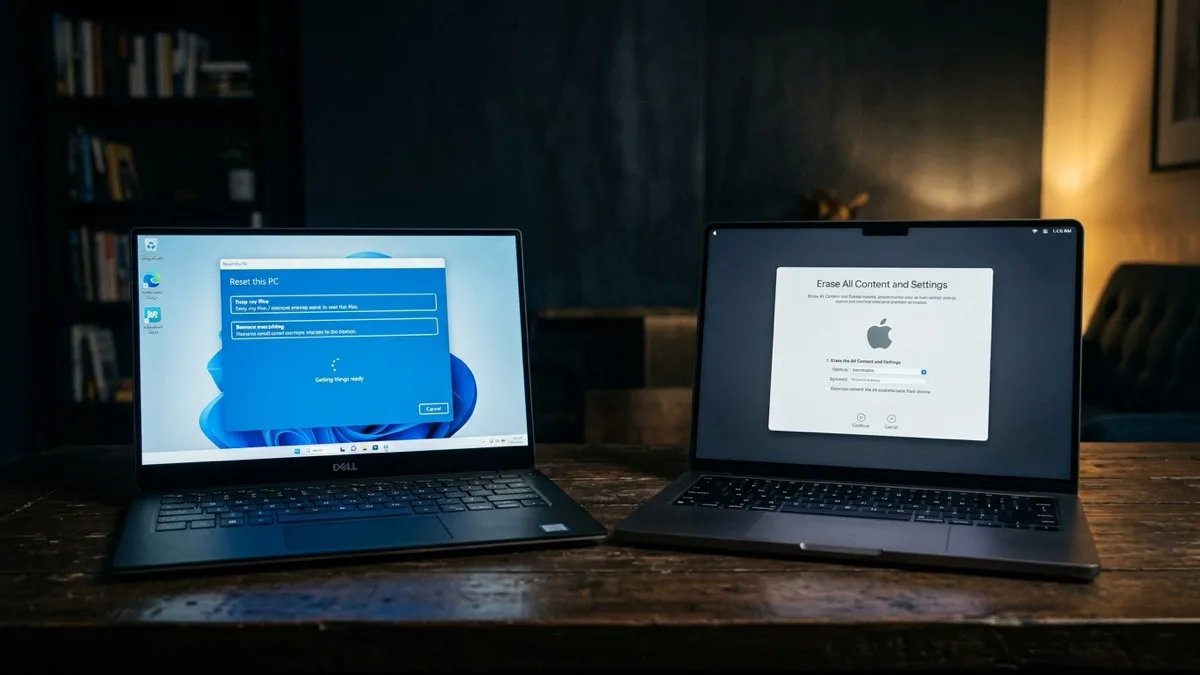
Quick answer: To factory reset a Windows 10 or 11 laptop, open Settings → System → Recovery → Reset this PC, then choose Keep my files or Remove everything. On a modern Mac, open Settings → General → Transfer or Reset → Erase All Content and Settings. But before you touch either button: back up your files and sign out of your Microsoft account, iCloud and Find My — otherwise the device can stay locked and unusable. If a reset is meant to fix slowness or errors rather than wipe the machine for sale, a remote tune-up first often saves you the hassle.
What this guide covers
When a factory reset is — and isn't — the right answer
A factory reset wipes your installed apps, settings and (optionally) your files, then reinstalls a clean copy of Windows or macOS. It's the right move in three situations: you're selling, gifting or recycling the device; the system is so tangled with malware or broken software that a clean slate is faster than untangling it; or you're handing the machine to someone else and want your data gone.
It is the wrong move for a lot of the problems people reach for it to solve. A reset does not fix hardware — a failing drive, swollen battery, dying fan or bad RAM will behave exactly the same on a fresh install. And if your only complaint is that the computer feels slow, a reset is overkill. Most slowness comes from startup bloat, a near-full drive, or background apps, all of which a targeted tune-up fixes in under an hour without erasing a thing. Read why your computer is so slow before you nuke it.
One more honest caveat: if you reset to escape a forgotten password or a locked account, it usually won't work — modern resets are designed to keep the device tied to its owner. We cover that trap below.
The critical pre-reset checklist
This is the part people skip and regret. A factory reset is irreversible once it starts, so run through every item here first. It takes fifteen minutes and saves you days.
- Back up your files. Copy documents, photos, downloads and desktop to an external drive or cloud (OneDrive, iCloud, Google Drive). Don't trust a single copy. If you've already lost something, stop and read how to recover deleted files before resetting — a reset overwrites them for good.
- Sign out of your Microsoft account (Windows) so the new owner — or you — can set the PC up cleanly without an account conflict.
- Sign out of iCloud, turn off Find My Mac, and sign out of your Apple ID (Mac). This is non-negotiable: skip it and Activation Lock can leave the Mac unusable and unsellable. The modern "Erase All Content and Settings" tool signs you out for you, but older Macs do not.
- Note your product keys and licenses — Office, Adobe, antivirus, games. Deauthorize apps that limit installs per device (iTunes/Music, Adobe, some DAWs).
- Export browser data and passwords. If you use a browser password manager, export or confirm it's syncing to your account before everything is wiped.
How to factory reset Windows 11 and Windows 10
Both versions use the same built-in tool, just one menu apart. As of 2026, the steps are stable across current Windows 11 builds and Windows 10 22H2.
- Open Settings. Windows 11: Settings → System → Recovery. Windows 10: Settings → Update & Security → Recovery.
- Under Reset this PC, click Reset PC (Windows 11) or Get started (Windows 10).
- Choose Keep my files (removes apps and settings, leaves your documents) or Remove everything (wipes the lot — use this for selling).
- Pick how to reinstall: Cloud download (pulls a fresh ~4 GB copy of Windows from Microsoft — best if your install is corrupted) or Local reinstall (rebuilds from files on the PC — faster, no big download).
- If you're selling or recycling, click Change settings and turn on Clean data (sometimes shown as "fully clean the drive"). It takes much longer but makes casual data recovery far harder.
- Confirm and let it run. The PC reboots several times over 20–60 minutes. Keep it plugged in.
If Windows won't boot at all, you can reach the same tool from the recovery environment: hold Shift while clicking Restart, or power off mid-boot three times to trigger it, then choose Troubleshoot → Reset this PC.
How to factory reset a MacBook or Mac
The right method depends on your Mac's age. Check Apple menu → About This Mac first.
Apple Silicon (M1–M4) and Intel Macs with a T2 chip — almost everything from 2018 onward — use the one-click modern method:
- Open System Settings → General → Transfer or Reset.
- Click Erase All Content and Settings.
- Enter your password, then follow the prompts. macOS automatically signs you out of Apple ID, turns off Find My and Activation Lock, removes your fingerprints and wallet cards, and erases your data — then reinstalls a clean macOS. This is the safe, sell-ready path.
Older Intel Macs (pre-2018, no T2) need the manual route:
- Sign out of iCloud, iMessage and Find My Mac, and sign out of your Apple ID, manually first.
- Restart and hold Command-R to enter macOS Recovery.
- Open Disk Utility, select your startup disk (usually "Macintosh HD"), click Erase, and use APFS as the format.
- Quit Disk Utility, choose Reinstall macOS, and follow the installer.
Selling a Mac and want a second set of hands so Activation Lock never bites? Our MacBook support team does this remotely, start to finish.
We make sure you back up first, sign out of accounts (so it isn't locked to your Apple ID / Microsoft account), and confirm a reset is actually the right call; flat $149.99 USD; No Fix No Fee.
Book a guided reset — $149.99Keep my files vs. wipe everything
The single most important choice is whether your personal data survives. Here's the plain-English breakdown.
| Option | Your files | Apps & settings | Best for |
|---|---|---|---|
| Windows: Keep my files | Kept | Removed | Fixing a misbehaving PC you're keeping |
| Windows: Remove everything | Erased | Removed | Selling, gifting, recycling |
| Windows: Remove + Clean data | Erased & scrubbed | Removed | Selling — sensitive data, max safety |
| Mac: Erase All Content & Settings | Erased | Removed | Any modern Mac you're keeping or selling |
Rule of thumb: keeping the machine and just fixing it? Choose Keep my files. Letting it go to anyone else? Wipe everything, and on Windows turn on the clean-data option. If the data is genuinely sensitive and the drive may have already failed, talk to a specialist before erasing — see our data recovery service.
What a factory reset does NOT bypass
This is where DIY resets go wrong. A factory reset is not a master key, and modern devices are deliberately built so a wipe can't strip an owner's protection. If you don't have the credentials, a reset won't help:
- BitLocker (Windows). If your drive is encrypted and you don't have the recovery key, resetting or reinstalling won't unlock the existing data — and you may be prompted for the key just to proceed.
- Microsoft account / device lock. A reset doesn't remove a PC from a Microsoft account or bypass a sign-in you can't access. To recover an account itself, see how to reset a Windows password.
- Activation Lock (Mac). If Find My was on and you didn't sign out, the Mac will demand the original Apple ID after erasing. No password, no use — which is exactly why a stolen or improperly-sold Mac becomes a paperweight.
Bottom line: reset to clean a device you own and can sign into. If you're locked out, a reset is not the answer — account recovery is.
Reset the right way, the first time
A factory reset is a clean, powerful tool when it's the right tool — for selling, gifting, or starting fresh after a malware mess. It's the wrong tool for hardware faults and forgotten passwords, and a single skipped sign-out can lock a perfectly good device for good. Back up, sign out of every account, confirm a reset is actually what you need, and only then press the button.
RemoteFix 24/7 does this with you over a secure remote session — anywhere in the world, same day. We confirm a reset is the right call, back you up, handle the account sign-outs so Activation Lock and Microsoft-account locks never bite, and stay on the line until the device boots clean. Flat $149.99 USD (or $79.99 Quick), No Fix, No Fee, in 130+ cities.
Frequently asked questions
Will a factory reset speed up my slow computer?
Sometimes, but it's rarely the best first step. If the slowness comes from startup bloat, a packed drive or background apps, a quick tune-up fixes it in under an hour without erasing anything. A reset only helps if software is deeply broken — and it does nothing for a failing drive, weak battery or other hardware, which will feel just as slow on a fresh install.
Does a factory reset permanently delete my files?
If you choose Remove everything on Windows or Erase All Content and Settings on a Mac, yes — your files are gone and very hard to recover, especially with the clean-data option on. That's why backing up first is essential. If you choose Windows' Keep my files, your documents stay; only apps and settings are removed.
Why is my Mac asking for an Apple ID after I reset it?
That's Activation Lock. If Find My was still on and you didn't sign out of your Apple ID before erasing, the Mac stays tied to your account and demands the original Apple ID and password to continue. Always sign out of iCloud and Find My first — or use Erase All Content and Settings, which signs you out automatically.
Can a factory reset remove a password or account lock I forgot?
No. Modern resets are designed to keep a device tied to its owner, so they won't bypass a Microsoft account lock, an Apple ID, or BitLocker encryption you don't have the key for. If you're locked out, you need account recovery, not a reset. Resetting a locked device often just leaves it locked and empty.
Should I use cloud download or local reinstall on Windows?
Use local reinstall if your Windows files are healthy and you want speed with no large download. Use cloud download — about a 4 GB pull from Microsoft — if your installation is corrupted, infected, or the local reinstall fails. Cloud download gives you the freshest copy of Windows but needs a stable internet connection.